
The SQL Server Unicode problem: why your data might not be what you think it is?
Having examined Unicode handling in other databases, we will see that its implementation in SQL Server proves to be particularly complex. We will discover how the burden of backwards compatibility has given rise to new features which, in reality, have serious shortcomings.
Looking to improve your skills? Discover our trainings sessions! Learn more.
Introduction
I have been researching Unicode for several years now. In recent months, I have examined Unicode handling in other databases, such as MySQL and MariaDB, and discovered some interesting behaviours (e.g., the effects of disabling strict mode, the behaviour of string manipulation functions (p. 73)). However, Microsoft SQL Server has exceeded all my expectations; it is a veritable minefield of pitfalls. SQL Server appears to have been held back for decades by technical debt, driven by a commitment to backward compatibility. Yet, even when new decisions are made, new features are not necessarily implemented correctly, nor are past errors rectified. Let us dive straight into the intricacies of Unicode handling in Microsoft’s database: SQL Server.
Default Encoding
Behind this simple heading lies a reality that is overly complex.
To complicate matters right from the start, and unlike other DBMSs, SQL Server does not have a single, global default encoding; instead, the default encoding varies depending on the context. This can make it impossible to change the default encoding (while manual changes are possible, you cannot permanently alter the value used when nothing is specified) and makes it difficult to determine exactly which encoding is currently being used for a given piece of data. It is therefore easy to end up with a mix of encodings (Unicode or otherwise) without fully understanding what is happening.
First point of context: a column’s final encoding depends on its data type (DATA_TYPE). Note that encoding applies to, and is relevant for, only those columns with a “character string” type, primarily: char, varchar, text, nchar, nvarchar, and ntext.
Furthermore, somewhat counter-intuitively, you cannot directly specify the desired encoding (the CHARACTER_SET_NAME, which we equate with encoding); instead, you specify the collation (COLLATION_NAME), which determines the associated encoding.
A second contextual factor influencing the default encoding is the language of the Windows server hosting the database.
Let’s consider a table with various column types, without specifying an encoding.
CREATE TABLE column_encoding
(
a CHAR(10),
b VARCHAR(10),
c TEXT,
d NCHAR(10),
e NVARCHAR(10),
f NTEXT
);
Let’s examine the collation and encoding that have been defined.
SELECT
COLUMN_NAME,
DATA_TYPE,
CHARACTER_MAXIMUM_LENGTH,
CHARACTER_SET_NAME,
COLLATION_NAME
FROM
INFORMATION_SCHEMA.COLUMNS
WHERE
TABLE_NAME = 'column_encoding';
On Microsoft SQL Server 2016 (13.0) and 2019 (15.0) running on a French version of Windows, the result is as follows:
COLUMN_NAME|DATA_TYPE|CHARACTER_MAXIMUM_LENGTH|CHARACTER_SET_NAME|COLLATION_NAME|
``` -----------+---------+------------------------+------------------+--------------+
a          |char     | 10|iso_1             |French_CI_AS  |
b          |varchar  | 10|iso_1             |French_CI_AS  |
c          |text     | 2147483647|iso_1             |French_CI_AS  |
d          |nchar    | 10|UNICODE           |French_CI_AS  |
e          |nvarchar | 10|UNICODE           |French_CI_AS  |
f          |ntext    | 1073741823|UNICODE           |French_CI_AS  |
We can see that in both MS SQL Server 2016 and MS SQL Server 2019, the char, varchar, and text types use the iso_1 character set, whereas the “n” types (nchar, nvarchar, ntext) use the UNICODE character set.
Two new issues have just arisen:
iso_1is completely meaninglessUNICODEmay make sense as a character set, but it does not tell us which encoding is being used
To clarify matters, let’s query the character set system table.
SELECT [description]
FROM   dbo.syscharsets
WHERE  [name] = N'iso_1';
description                                                 |
------------------------------------------------------------+
ISO 8859-1 (Latin-1) - Western European 8-bit character set.|
Two new issues have just arisen:
- Microsoft states that the
iso_1label corresponds to ISO 8859-1 (Latin-1). The problem? That is incorrect! It is actually CP1252 mislabelled as ISO-8859-1. The two character sets are similar but distinct. This is a Microsoft error, but having propagated it everywhere for so long, they decided not to fix it. Consequently, Microsoft’s documentation cannot be relied upon. - The
UNICODElabel does not appear in thedbo.syscharsetstable… This is because, in this context,UNICODEis not a character set but a function that returns eitherUCS-2orUTF-16, depending on the SQL Server version (a contextual factor that can also influence the default encoding).
Before delving further into specific behaviours, we can already make the following observation regarding Microsoft’s design choices concerning Unicode integration.
It is easy to understand that older systems or programming languages existed both before and after the advent of Unicode and had to manage that transition. Microsoft’s decision to prioritize backward compatibility above all else is open to criticism, yet it is entirely understandable and acceptable for a major corporation that bears responsibilities toward its clients and requires stability. However, many systems and programming languages chose to manage this transition by switching their default encoding from ASCII (or an equivalent) to one of the Unicode standards (often UTF-8, though UTF-16 is also used) and by updating all functions, such as string manipulation routines, to accommodate the expanded character set and the associated rules and constraints. This approach does not entail a significant break in compatibility, as the initial section of the Unicode table fully incorporates the ASCII table, specifically to ensure backward compatibility, and because, under UTF-8, these initial characters are represented by a single byte with the same value as in ASCII. Consequently, the transition from ASCII (though not from other ISO 8859 encodings) to UTF-8 (though not to UTF-16 or UTF-32) is seamless. Functions that previously operated on ASCII continue to work with Unicode within the ASCII range but must be extended to function beyond it.
Microsoft, however, chose a different path. Rather than migrating from the old system to the new one, they opted to retain the legacy system and have it coexist with the new one, a “technology stacking” approach similar to that seen in mobile network generations (2G, 3G, 4G, 5G). At Microsoft, not only regarding SQL Server but across the entire Windows ecosystem, this results in a dual reality: on one hand, the legacy environment, comprising functions and data types that operate solely on ASCII; and on the other, the modern environment, featuring functions and data types that handle either “wide characters” (encoded using more than one byte) or, ideally, full Unicode support that accounts for all its specific characteristics. That is why, in MS SQL Server, we find the data types char, varchar, and text for “ASCII,” and nchar, nvarchar, and ntext for “Unicode.” The same applies to functions: CHAR() vs. NCHAR(), CONCAT() vs. CONCAT_WS() (note that in this case, it is not NCONCAT()), ASCII() vs. UNICODE(), or even STR() vs. UNISTR (and not NSTR or STR_WS). The informed reader will realize that using the wrong function or data type has consequences and that the coexistence of the two systems introduces its own share of added complexity.
Despite this commitment to maintaining backward compatibility, Microsoft does occasionally introduce changes. For instance, the documentation for the char and varchar types contains the following paragraph (subject to translation correction):
Starting with SQL Server 2019 (15.x), when an UTF-8 enabled collation is used, these data types store the full range of Unicode character data and use UTF-8 character encoding. If a non-UTF-8 collation is specified, these data types store only a subset of characters supported by that collation’s corresponding code page.
This means that UTF-8 encoding has been added and is supported by default only for the char and varchar types (but not for text?) and only when a corresponding collation is defined; otherwise, the encoding remains CP1252.
Indeed, in the version 2016 de SQL Server, there are 52 collation algorithms for French alone.
SELECT name, description FROM sys.fn_helpcollations() WHERE name LIKE 'French%';
name                     |description                                                                                                        |
-------------------------+-------------------------------------------------------------------------------------------------------------------+
French_BIN               |French, binary sort                                                                                                |
French_BIN2              |French, binary code point comparison sort                                                                          |
French_CI_AI             |French, case-insensitive, accent-insensitive, kanatype-insensitive, width-insensitive                              |
French_CI_AI_WS          |French, case-insensitive, accent-insensitive, kanatype-insensitive, width-sensitive                                |
French_CI_AI_KS          |French, case-insensitive, accent-insensitive, kanatype-sensitive, width-insensitive                                |
French_CI_AI_KS_WS       |French, case-insensitive, accent-insensitive, kanatype-sensitive, width-sensitive                                  |
[…]
French_100_CS_AS_SC      |French-100, case-sensitive, accent-sensitive, kanatype-insensitive, width-insensitive, supplementary characters    |
French_100_CS_AS_WS_SC   |French-100, case-sensitive, accent-sensitive, kanatype-insensitive, width-sensitive, supplementary characters      |
French_100_CS_AS_KS_SC   |French-100, case-sensitive, accent-sensitive, kanatype-sensitive, width-insensitive, supplementary characters      |
French_100_CS_AS_KS_WS_SC|French-100, case-sensitive, accent-sensitive, kanatype-sensitive, width-sensitive, supplementary characters        |
In SQL Server 2019, there are 68 for French, as UTF-8 has been introduced.
name                          |description                                                                                                              |
------------------------------+-------------------------------------------------------------------------------------------------------------------------+
French_BIN                    |French, binary sort                                                                                                      |
French_BIN2                   |French, binary code point comparison sort                                                                                |
French_CI_AI                  |French, case-insensitive, accent-insensitive, kanatype-insensitive, width-insensitive                                    |
French_CI_AI_WS               |French, case-insensitive, accent-insensitive, kanatype-insensitive, width-sensitive                                      |
French_CI_AI_KS               |French, case-insensitive, accent-insensitive, kanatype-sensitive, width-insensitive                                      |
French_CI_AI_KS_WS            |French, case-insensitive, accent-insensitive, kanatype-sensitive, width-sensitive                                        |
[…]
French_100_CS_AS_SC_UTF8      |French-100, case-sensitive, accent-sensitive, kanatype-insensitive, width-insensitive, supplementary characters, UTF8    |
French_100_CS_AS_WS_SC_UTF8   |French-100, case-sensitive, accent-sensitive, kanatype-insensitive, width-sensitive, supplementary characters, UTF8      |
French_100_CS_AS_KS_SC_UTF8   |French-100, case-sensitive, accent-sensitive, kanatype-sensitive, width-insensitive, supplementary characters, UTF8      |
French_100_CS_AS_KS_WS_SC_UTF8|French-100, case-sensitive, accent-sensitive, kanatype-sensitive, width-sensitive, supplementary characters, UTF8        |
Indeed, if one forces a collation algorithm that supports UTF-8 (e.g. French_100_CI_AS_SC_UTF8) on SQL Server 2019, it will indeed convert the encoding to UTF-8.
CREATE TABLE column_encoding_utf8
(
a CHAR(10) COLLATE French_100_CI_AS_SC_UTF8,
b VARCHAR(10) COLLATE French_100_CI_AS_SC_UTF8,
d NCHAR(10) COLLATE French_100_CI_AS_SC_UTF8,
e NVARCHAR(10) COLLATE French_100_CI_AS_SC_UTF8
);
SELECT
COLUMN_NAME,
DATA_TYPE,
CHARACTER_MAXIMUM_LENGTH,
CHARACTER_SET_NAME,
COLLATION_NAME
FROM
INFORMATION_SCHEMA.COLUMNS
WHERE
TABLE_NAME = 'column_encoding_utf8';
COLUMN_NAME|DATA_TYPE|CHARACTER_MAXIMUM_LENGTH|CHARACTER_SET_NAME|COLLATION_NAME          |
-----------+---------+------------------------+------------------+------------------------+
a          |char     |                      10|utf8              |French_100_CI_AS_SC_UTF8|
b          |varchar  |                      10|utf8              |French_100_CI_AS_SC_UTF8|
d          |nchar    |                      10|UNICODE           |French_100_CI_AS_SC_UTF8|
e          |nvarchar |                      10|UNICODE           |French_100_CI_AS_SC_UTF8|
Once again, the discerning reader will have noticed that text and ntext were not included in the example above. This is because they are deprecated data types with hard-coded encoding; consequently, the collation algorithm cannot be changed. Anyone attempting this operation would encounter the error message below.
SQL Error [4188] [S0001]: Column or parameter 'f' has type 'ntext' and collation 'French_100_CI_AS_SC_UTF8'. The legacy LOB types do not support UTF-8 or UTF-16 encodings. Use types varchar(max), nvarchar(max) or a collation which does not have the _SC or _UTF8 flags.
Nevertheless, nchar and nvarchar remained set to UNICODE rather than switching to utf8 when a UTF-8 collation is forced. We thus find ourselves in the curious situation where char and varchar types (“ASCII” types) support Unicode via UTF-8, while nchar and nvarchar types (“Unicode” types) do not support UTF-8 Unicode encoding, but only UTF-16 Unicode encoding. Furthermore, in the case of MS SQL Server 2012 (or older) or Azure SQL, the UNICODE() function will even return UCS-2, a precursor to Unicode that is not actually part of the Unicode standard. In short, non-Unicode types can support Unicode, and Unicode types can support non-Unicode data.
Let us try to summarize the supported values in a table.
| Column type | < 2019 | >= 2019 |
|---|---|---|
| char | CP1252* | CP1252* or UTF-8 |
| varchar | CP1252* | CP1252* or UTF-8 |
| text | CP1252* | CP1252* |
| nchar | UCS-2 or UTF-16 | UCS-2 or UTF-16 |
| nvarchar | UCS-2 or UTF-16 | UCS-2 or UTF-16 |
| ntext | UCS-2 or UTF-16 | UCS-2 or UTF-16 |
Legend:
- CP1252*: CP1252 or another 1-byte encoding
< 2019means prior to SQL Server version 2019>= 2019means SQL Server 2019 and later (at least up to 2022)
In conclusion, the default encoding depends, at a minimum, on:
- the data type
- the collation
- the server language
- the SQL Server version
Collation
The collation algorithm governs rules for sorting, case conversion, and accent handling for comparison purposes. These rules affect the results of numerous database operations.
As previously noted, it is impossible to define the encoding directly in SQL Server; instead, you must apply a collation algorithm, which in turn determines the encoding. However, to keep things from being too simple, the resulting encoding is not necessarily explicitly stated in the collation algorithm’s name.
Before discussing this in greater detail, we must explain the naming conventions used for collations.
_CS(case-sensitive): case-sensitive;_CI(case-insensitive): case-insensitive_AS(accent-sensitive): accent-sensitive;_AI(accent-insensitive): accent-insensitive_KS(kana-sensitive): Kana-sensitive_WS(width-sensitive): width-sensitive_VSS(variation-selector-sensitive): variation-selector-sensitive_BIN(binary): binary (bits)_BIN2(binary code point): binary (Unicode code point)_UTF8(UTF-8): stores data in UTF-8_SC(supplementary character): allows using all 17 Unicode planes, not just the BMP (when UTF-8 or UTF-16 is used)
Some points do not really make sense:
- Defining the encoding should be possible independently of the collation algorithm
- Collation algorithms serve to define comparison rules; as such,
_UTF8and_SCare not truly collation rules but rather a workaround necessitated by the fact that the encoding cannot be defined independently of the collation algorithm _SCshould be implicit and selected by default for encodings that support it
In my lab environment, since the Windows machine is set to French, the default server-level collation is French_CI_AS. The following query can be used to verify this.
SELECT SERVERPROPERTY('Collation');
|
------------+
French_CI_AS|
The same applies to determining the default collation at the database level, which is inherited from the server.
SELECT DATABASEPROPERTYEX('database_name_here', 'Collation');
|
------------+
French_CI_AS|
And finally, for columns, it is inherited from the database.
SELECT
COLUMN_NAME,
DATA_TYPE,
CHARACTER_MAXIMUM_LENGTH,
CHARACTER_SET_NAME,
COLLATION_NAME
FROM
INFORMATION_SCHEMA.COLUMNS
WHERE
TABLE_NAME = 'table_name_here';
There is also an older alternative syntax using sys.
So far, we have not discussed security issues, focusing instead on complexity and counter-intuitive, tricky behaviours. However, all these explanations will be useful for understanding what follows.
Limited character sets
I will reveal the conclusion of this section right away. Unlike a smartly architected database, SQL Server allows the insertion of characters that are invalid for the target encoding, and there is no strict mode available to raise an exception in such cases. With SQL Server, when a “narrow” character set like iso_1 (256 symbol codes) is used, inserting Unicode characters (hundreds of thousands of symbol codes) that fall outside the compatible range is permitted. Since the invalid character cannot be represented in that encoding, it is automatically and silently converted using a proprietary Microsoft algorithm: best fit mapping. This leads to widespread collisions and data mutations.
Now, let’s observe SQL Server’s behaviour when the character < (U+FF1C) is injected into a column using my server’s default collation (French_CI_AS). < (U+FF1C) is a character that is necessarily encoded using multiple bytes (3 in UTF-8, 2 in UTF-16; see unisec output); it has existed for a long time and is located in the BMP. This character does not exist in single-byte Windows code pages (e.g., CP1252).
$ unisec dump hex <
UTF-8: ef bc 9c
UTF-16BE: ff1c
UTF-16LE: 1cff
UTF-32BE: 0000ff1c
UTF-32LE: 1cff0000

$ unisec properties char '<' | head -8
Name:               FULLWIDTH LESS-THAN SIGN
Code Point:         U+FF1C (65308)

Block:              Halfwidth and Fullwidth Forms
Category:           Symbol
Sub-Category:       Math_Symbol
Script:             Common
Since (age):        Version 1.1
For comparison purposes and to help interpret the tools’ hexadecimal output, the character a will be used as a reference.
$ unisec dump hex a
UTF-8: 61
UTF-16BE: 0061
UTF-16LE: 6100
UTF-32BE: 00000061
UTF-32LE: 61000000

$ unisec properties char 'a' | head -8
Name: LATIN SMALL LETTER A
Item Code: U+0061 (97)

Block: Basic Latin
Category: Letter
Sub-Category: Lowercase_Letter
Script: Latin
Since (age): Version 1.1
SQL query to create the test table (tested on MS SQL Server 2016 & 2019):
CREATE TABLE my_narrow_column
(
mytext_narrow VARCHAR(10) COLLATE French_CI_AS,
mytext_wide NVARCHAR(10) COLLATE French_CI_AS
);
Checking column encoding.
SELECT CHARACTER_SET_NAME FROM INFORMATION_SCHEMA.COLUMNS WHERE TABLE_NAME = 'my_narrow_column' AND COLUMN_NAME LIKE 'mytext_%';
/* Exit :
iso_1
UNICODE
*/
Data insertion.
INSERT INTO my_narrow_column VALUES ('a', 'a'); /* => Ok, no error */
INSERT INTO my_narrow_column VALUES ('<', '<'); /* => Ok, no error */
The output shows that < (U+FF1C) is transformed into < (U+003C) on insertion, both for the column mytext_narrow (iso_1) and for mytext_wide (UNICODE).
$ sqlcmd query --Unicode database --query 'SELECT mytext_narrow, mytext_wide FROM my_narrow_column;'
mytext_narrow mytext_wide
------------- -----------
a a
<<

(2 rows affected)

$ sqlcmd query --Unicode database --query 'SELECT mytext_narrow, mytext_wide FROM my_narrow_column;' | awk 'NR >= 3 && NR <= 4' | hexxy
0000000: 6120 2020 2020 2020 2020 2020 2020 6120  a             a
0000010: 2020 2020 2020 2020 200a 3c20 2020 2020           .<
0000020: 2020 2020 2020 2020 3c20 2020 2020 2020          <
0000030: 2020 200a                                         .
As previously explained, the iso_1 column was expected to convert the value using BestFit; however, for the UNICODE column, the value should have been storable, yet it was converted anyway. Since the lab databases are running MS SQL Server 2016 & 2019, UNICODE returns UTF-16. And even if UCS-2 were returned, < (U+FF1C) lies within the BMP, so it is also encodable in UCS-2. Had it been a non-BMP character, an explanation might have been found in a limitation that Microsoft documents regarding the nvarchar type.
SQL Server offers data types such as
ncharandnvarcharto store Unicode data within the BMP range (000000 - 00FFFF), which the database engine encodes using UCS-2.
In SQL Server 2012 (11.x), Microsoft introduced the _SC collation family to enable the use of the full Unicode range with nchar and nvarchar.
Starting with SQL Server 2017 (14.x), all collations (only new ones from this version onwards, not retroactively) automatically support _SC by default; consequently, the suffix no longer appears in the name. Therefore, it is impossible to determine, simply by reading the collation name, whether planes 1 through 17 are supported or only the first plane. This depends on the collation version. Version 80 collations do not support the _SC attribute, while versions 90 and 100 do; version 140 collations do not explicitly support it because they are _SC by default.
SQL Server 2019 (15.x) extends support for supplementary characters to char and varchar data types through new UTF-8-compatible collations (_UTF8). These data types also allow for the representation of the entire Unicode character set.
However, the same behaviour is observed in MS SQL Server 2019 with the French_100_CI_AS_SC collation, which is supposed to use UTF-16, and the French_100_CI_AS_SC_UTF8 collation, which uses UTF-8. There must, therefore, be another cause.
CREATE TABLE my_narrow_column2
(
    narrow VARCHAR(10) COLLATE French_CI_AS,
    wide1 NVARCHAR(10) COLLATE French_CI_AS,
    wide2 NVARCHAR(10) COLLATE French_100_CI_AS_SC,
    wide3 NVARCHAR(10) COLLATE French_100_CI_AS_SC_UTF8 /* Only for MS SQL Server 2019 */
);

SELECT CHARACTER_SET_NAME FROM INFORMATION_SCHEMA.COLUMNS WHERE TABLE_NAME = 'my_narrow_column2'; /* => narrow = iso_1, widex = UNICODE */

INSERT INTO my_narrow_column2 VALUES ('a', 'a', 'a', 'a'); /* => Ok */
INSERT INTO my_narrow_column2 VALUES ('<', '<', '<', '<'); /* => Ok */
$ sqlcmd query --query 'SELECT narrow, wide1, wide2, wide3 FROM my_narrow_column2;' | awk 'NR >= 3 && NR <= 4' | hexxy
0000000: 6120 2020 2020 2020 2020 2061 2020 2020  a          a
0000010: 2020 2020 2020 6120 2020 2020 2020 2020        a
0000020: 2061 2020 2020 2020 2020 200a 3c20 2020   a         .<
0000030: 2020 2020 2020 203c 2020 2020 2020 2020         <
0000040: 2020 3c20 2020 2020 2020 2020 203c 2020    <          <
0000050: 2020 2020 2020 200a                                 .
I tested with the case-sensitive version _CS instead of the case-insensitive version _CI, just in case the latter was poorly implemented and causing a conflict, but it made no difference; so far, it has been impossible to insert a character outside the BMP.
At this point, I suspect this is an interface issue rather than a database issue. Up until now, go-sqlcmd (a Microsoft tool) has been used.
To check whether this is a product-related issue, you can connect to the database using dBeaver and insert, store and retrieve non-BMP characters. Could it therefore be Microsoft’s go-sqlcmd that is causing the encoding issues? Perhaps on the client side, or perhaps by connecting to the database using UCS-2 instead of UTF-16 for inserts? To be absolutely sure, let’s use FreeTDS instead, with the Ruby gem TinyTDS (tiny_tds), for better control over the encoding.
require 'tiny_tds'
require 'tty-table'
# Converter: array of hashes to formatted table
def table_print(table)
headers = table.first.keys
rows = table.map{ |h| h.values }
puts TTY::Table.new(header: headers, rows: rows).render(:basic)
end
# Connection to database
client = TinyTds::Client.new(
username: 'edited', password: 'edited',
host: 'edited', port: 1433,
database: 'Unicode', azure: false,
encoding: 'UTF-8', use_utf16: true
)
# Create a table
query = <<~SQL
CREATE TABLE my_narrow_column
(
mytext_narrow VARCHAR(10) COLLATE French_CI_AS,
mytext_wide NVARCHAR(10) COLLATE French_CI_AS
);
SQL
client.execute(query).insert
# Insert values
client.execute("INSERT INTO my_narrow_column VALUES ('a', 'a');").insert
client.execute("INSERT INTO my_narrow_column VALUES ('<', '<');").insert
# Check character set and column collation
query = <<~SQL
SELECT CHARACTER_SET_NAME, COLLATION_NAME
FROM INFORMATION_SCHEMA.COLUMNS
WHERE TABLE_NAME = 'my_narrow_column'
AND COLUMN_NAME LIKE 'mytext_%';
SQL
table_print(client.execute(query).to_a)
# Retrieve inserted data
table_print(client.execute('SELECT mytext_narrow, mytext_wide FROM my_narrow_column;').to_a)
# Close database connection
client.close
# […]

# Create a table
query = <<~SQL
CREATE TABLE my_narrow_column2
(
narrow VARCHAR(10) COLLATE French_CI_AS,
wide1 NVARCHAR(10) COLLATE French_CI_AS,
wide2 NVARCHAR(10) COLLATE French_100_CI_AS_SC,
wide3 NVARCHAR(10) COLLATE French_100_CI_AS_SC_UTF8 /* Only for MS SQL Server 2019 */
);
SQL
client.execute(query).insert
# Insert values
client.execute("INSERT INTO my_narrow_column2 VALUES ('a', 'a', 'a', 'a');").insert
client.execute("INSERT INTO my_narrow_column2 VALUES ('<', '<', '<', '<');").insert

# Check the character set and collation of the columns
query = <<~SQL
SELECT CHARACTER_SET_NAME, COLLATION_NAME
FROM INFORMATION_SCHEMA.COLUMNS
WHERE TABLE_NAME = 'my_narrow_column2';
SQL
table_print(client.execute(query).to_a)

# Retrieve the inserted data
table_print(client.execute('SELECT narrow, wide1, wide2, wide3 FROM my_narrow_column2;').to_a)

# […]
The behaviour observed remains the same between TinyTDS (tiny_tds) and go-sqlcmd, even though, on this occasion, the TinyTDS (tiny_tds) client encoding is set to UTF-8 and the database encoding for ‘wide’ characters is forced to UTF-8 (to ensure that the database engine does not use UCS-2). Retrieving data poses no problem, but inserting data is affected by the client. When trying the ms-mssql.mssql extension for Visual Studio Code, the same result is obtained; this extension does not offer any encoding settings, except for CSV export.
In dBeaver, inserting queries containing ‘wide’ characters via the SQL console, or manually entering these characters by editing the cells in the data table view, allows them to be stored correctly. So the problem seems to be on the client side, doesn’t it?
Character String literals
I stumbled across the answer quite by chance whilst watching a random video on YouTube. In MS SQL Server, all string literals are non-Unicode by default (which encoding?) even when the column is configured as Unicode. To support Unicode, you need to add the ‘N’ prefix before the first quotation mark.
Let’s compare the two cases – with and without – using a more illustrative example outside the BMP:
INSERT INTO my_narrow_column_emo VALUES ('👻', '👻', '👻', '👻');
INSERT INTO my_narrow_column_emo VALUES (N'👻', N'👻', N'👻', N'👻');
SELECT narrow, wide1, wide2, wide3 FROM my_narrow_column_emo;
$ sqlcmd query --database unicode --query 'SELECT narrow, wide1, wide2, wide3 FROM my_narrow_column_emo;' | awk 'NR >= 3 && NR <= 4'
??         ??         ??         ??
??         👻          👻          👻

$ sqlcmd query --database unicode --query 'SELECT narrow, wide1, wide2, wide3 FROM my_narrow_column_emo;' | awk 'NR >= 3 && NR <= 4' | hexxy
0000000: 3f3f 2020 2020 2020 2020 203f 3f20 2020  ??         ??
0000010: 2020 2020 2020 3f3f 2020 2020 2020 2020        ??
0000020: 203f 3f20 2020 2020 2020 200a 3f3f 2020   ??        .??
0000030: 2020 2020 2020 20f0 9f91 bb20 2020 2020         ....
0000040: 2020 2020 20f0 9f91 bb20 2020 2020 2020       ....
0000050: 2020 20f0 9f91 bb20 2020 2020 2020 2020     ....
0000060: 0a
Thus, 👻 was literally converted to ?? when inserted as a standard string literal, even in NVARCHAR columns. However, when inserted with the N prefix, it was only converted in VARCHAR columns.
Let’s take the example of U+ff1c < again.
INSERT INTO my_narrow_column2 VALUES ('<', '<', '<', '<');
INSERT INTO my_narrow_column2 VALUES (N'<', N'<', N'<', N'<');
SELECT narrow, wide1, wide2, wide3 FROM my_narrow_column2;
$ sqlcmd query --database unicode --query 'SELECT narrow, wide1, wide2, wide3 FROM my_narrow_column2;' | awk 'NR >= 3 && NR <= 4'
<          <          <          <
<          <          <          <

$ sqlcmd query --database unicode --query 'SELECT narrow, wide1, wide2, wide3 FROM my_narrow_column2;' | awk 'NR >= 3 && NR <= 4' | hexxy
0000000: 3c20 2020 2020 2020 2020 203c 2020 2020  <          <
0000010: 2020 2020 2020 3c20 2020 2020 2020 2020        <
0000020: 203c 2020 2020 2020 2020 200a 3c20 2020   <         .<
0000030: 2020 2020 2020 20ef bc9c 2020 2020 2020         ...
0000040: 2020 2020 efbc 9c20 2020 2020 2020 2020      ...
0000050: 20ef bc9c 2020 2020 2020 2020 200a         ....
As we saw earlier, the character U+ff1c < was transformed into the character U+003c < when using a non-Unicode string literal or a column with a non-Unicode encoding. In this instance, the result is not ??.
The question is: is Microsoft’s BestFit algorithm Unicode-aware in some way, relying on a Unicode property such as Decomposition_Mapping, Idn_Mapping, or NFKC_Simple_Casefold, or does it attempt to find a suitable replacement character in a completely arbitrary and proprietary manner?
Implicit conversion
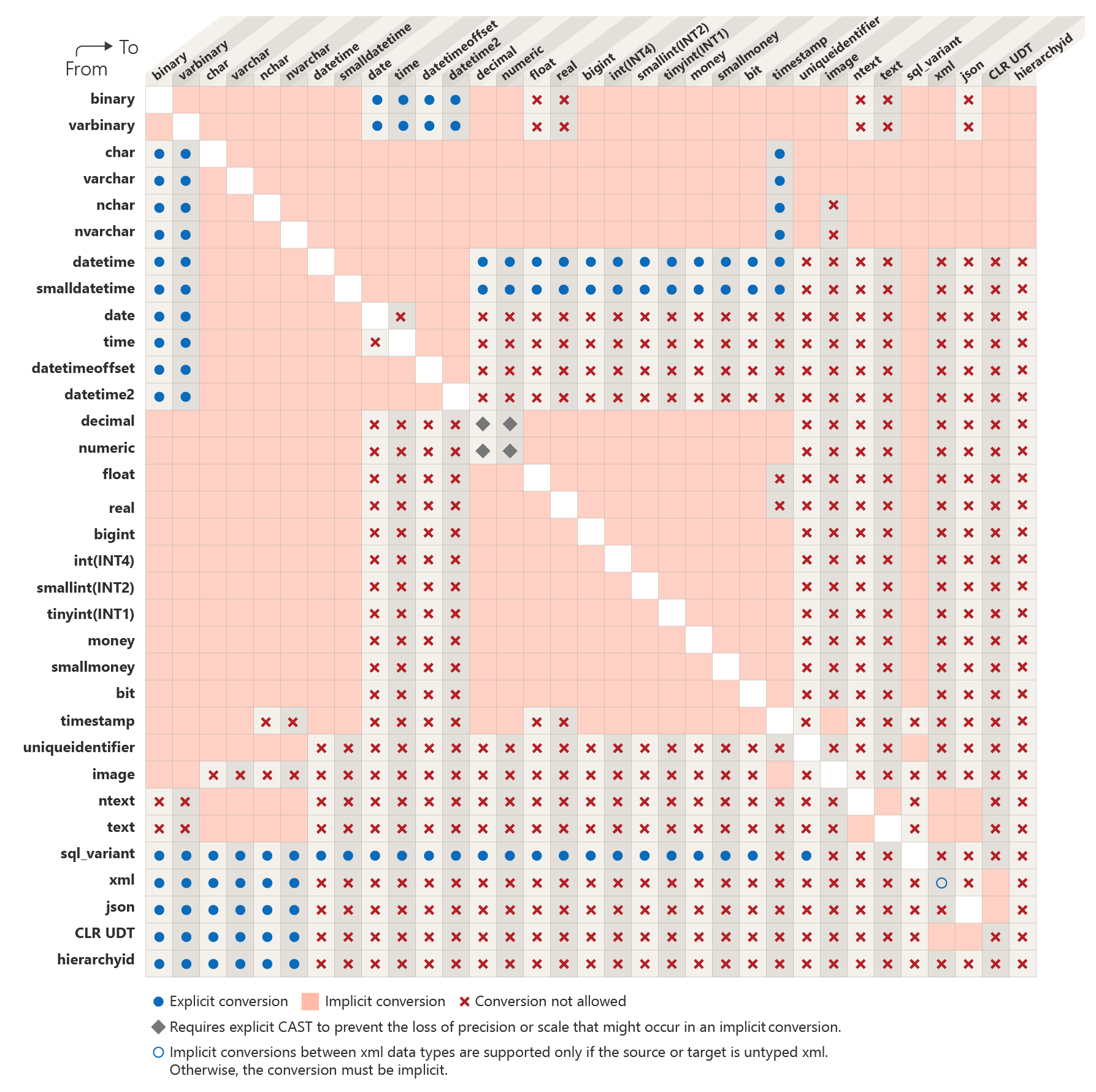
As previously discussed, implicit conversion exists and is determined by the type of statement: assignment, insertion, comparison, other expressions, etc. In some cases, the resulting data type depends on data type precedence rules. This chart shows that automatic conversion can be destructive, as implicit conversion can occur, for example, from nchar to char or from nvarchar to varchar.
Best Fit
In their article titled “WorstFit,” Orange Tsai and Splitline examined what happens when Windows converts a “wide-range” string (e.g., UTF-16 encoded) into a “narrow-range” string (e.g., CP1252 encoded), as well as how this conversion is performed using Microsoft’s BestFit algorithm.
- Orange Tsai - WorstFit: Unveiling Hidden Transformers in Windows ANSI!
- Devcore - WorstFit: Unveiling Hidden Transformers in Windows ANSI!
Under the hood, Microsoft’s internal API functions WideCharToMultiByte and RtlUnicodeStringToAnsiString are used to convert the “W” API (wide = Unicode) to the “A” API (ANSI = Windows code pages). This conversion is not standardized and depends on the vendor. Microsoft’s custom mapping, known as “Best Fit”, is stored as a text-based database on the Unicode website. Orange Tsai and Splitline have also made it easier to search this mapping via their website. Example queries for the characters presented earlier:
<(U+FF1C) ➡️<(0x003c) :CP:1252 WCHAR:0xff1c👻(U+1F47B) ➡️??(as there is no match) :CP:1252 WCHAR:0x1f47b
Later in the article, they explain how to turn this attack vector into actual vulnerabilities, such as filename manipulation, argument splitting, and environment variable confusion.
The “WorstFit” attack is similar to case-transformation collision, but it is more effective because it offers more collision candidates and makes it easier to find functions that implicitly perform the conversion compared to explicit case-transformation operations. It could even be likened to collisions involving compatibility normalization forms, such as NFKC and NFKD, though it is less powerful, as the destination range is more restricted and the result depends on the code page. An example of collisions generated by the WorstFit attacks described in the article, by transforming:
- Soft Hyphen (U+00AD) into Hyphen-Minus (U+002D) to inject arguments into CGIs using code pages 932, 936, and 950
- Fullwidth Solidus (U+FF0F), Fullwidth Reverse Solidus (U+FF3C), Yen Sign (U+00A5), Won Sign (U+20A9), and many others into Solidus (U+002F) or Reverse Solidus (U+005C) to manipulate file paths and create directory traversals using code pages 874, 125x, 932, and 949
- Fullwidth Quotation Mark (U+FF02), Fullwidth Reverse Solidus (U+FF3C), Yen Sign (U+00A5), Won Sign (U+20A9), and many others into Quotation Mark (U+0022) or Reverse Solidus (U+005C), in order to split CLI tool arguments and trigger command execution under code pages 874, 125x, 932, and 949.
The attacks described in the article primarily targeted web applications, CGI scripts, and certain well-known executables. This article focuses on identifying similar attacks against IIS by exploiting the limited character sets associated with implicit conversion. To illustrate how much more effective WorstFit-based collisions are compared to those based on normalization, here are a few figures:
- only 2 characters transform into
<(U+003C, LESS-THAN SIGN) following an NFKC or NFKD transformation - 22 characters transform into
<(U+003C, LESS-THAN SIGN) following a BestFit mapping
For example, in a .NET C# application running on Windows, strings are encoded in UTF-16; however, if the database column uses ANSI encoding, or if data is implicitly converted or an inappropriate data type is used (char, varchar, text), the data will be implicitly converted using “Best Fit” mapping. It is easy to see how a Unicode string might bypass a filter or WAF; once converted to ANSI, however, it could become a functional payload.
The PHP code below demonstrates a classic XSS payload that gets escaped by the application, alongside a Unicode version that is not escaped but is invalid and will not execute.
/* Classic XSS payload: valid but escaped */
print_r(htmlspecialchars("<script>alert('test')</script>"));
/* => <script>alert('test')</script> */
/* Unicode payload (Worst Fit), unescaped but invalid */
print_r(htmlspecialchars("〈script〉alert(ʹtestʹ)〈/script〉"));
/* => 〈script〉alert(ʹtestʹ)〈/script〉 */
However, once it passes the application filter, the payload is sent to the database for storage. Since the encoding here is CP1252, the Unicode payload is automatically converted via “Worst Fit,” reverting to a valid payload that gets executed.
CREATE TABLE worstfitx ( vary VARCHAR(50) COLLATE French_CI_AS );

SELECT COLUMN_NAME, TABLE_NAME, DATA_TYPE, CHARACTER_MAXIMUM_LENGTH, CHARACTER_SET_NAME, COLLATION_NAME FROM INFORMATION_SCHEMA.COLUMNS WHERE TABLE_NAME = 'worstfitx';
/* => vary,varchar,50,iso_1,French_CI_AS */

INSERT INTO worstfitx VALUES (N'〈script〉alert(ʹtestʹ)〈/script〉');

SELECT vary FROM worstfitx;
/* => <script>alert('test')</script> */
Similarly, even when files are stored on the file system, they are rarely accessed by their actual filenames but rather by a unique reference; the mapping between this reference and the filename, along with access permissions, is often stored in the database. Thus, when a file is uploaded, the application stores the filename in UTF-16 format, but when it needs to read it later, the file path is retrieved from the database and converted to CP-1252. Local file inclusion is therefore possible via this method.
CREATE TABLE worstfity ( id SMALLINT, file_name VARCHAR(50) COLLATE French_CI_AS );

SELECT COLUMN_NAME, TABLE_NAME, DATA_TYPE, CHARACTER_MAXIMUM_LENGTH, CHARACTER_SET_NAME, COLLATION_NAME FROM INFORMATION_SCHEMA.COLUMNS WHERE TABLE_NAME = 'worstfity';
/* =>
id,worstfity,smallint,NULL,NULL,NULL
file_name,worstfity,varchar,50,iso_1,French_CI_AS
*/

/* U+ff0E + U+2216 */
INSERT INTO worstfity VALUES (45, N'..∖..∖..∖..∖..∖Windows∖win.ini');

SELECT file_name FROM worstfity WHERE id = 45;
/* => ..\..\..\..\..\Windows\win.ini */
In this case, the file would be stored at the location C:\inetpub\uploads\..∖..∖..∖..∖..∖Windows∖win.ini, but accessing the file with ID 45 would actually resolve to C:\inetpub\uploads\..\..\..\..\..\Windows\win.ini, and thus C:\Windows\win.ini once the path is normalized. However, ..∖ might have allowed a filter to be bypassed.
Furthermore, on most code pages, the fallback character for non-matching characters is ? (U+003F). Consequently, the same attacks possible when MySQL strict mode is disabled can be used: shell filename expansion, injection of regular expression quantifiers or HTTP query parameters, or bypasses application firewalls.
For example, to store a ? when ? is filtered, one could simply save any character not specified in the destination code page’s “Best Fit” mapping table.
INSERT INTO worstfitx VALUES (N'<ʭphp');

SELECT vary FROM worstfitx ;
/* => <?php */
Collation and case-transformation collisions
As seen in the section on default encoding, the default collation is always case-insensitive (_CI).
This means that case-transformation collisions can occur implicitly when using string comparison functions and operators. For instance, the documentation for LIKE explicitly states that LIKE comparisons are affected by collation, unlike the = (string comparison or assignment) operator, for which no such behaviour is specified.
Here, both operators (= and LIKE) result in collisions.
SELECT IIF('abc' = 'ABC', 1, 0);
/* => 1 */
SELECT IIF(N'abc' = N'ABC', 1, 0);
/* => 1 */


SELECT 'equals' WHERE 'abc' LIKE 'ABC';
/* => equals */
SELECT 'equals' WHERE N'abc' LIKE N'ABC';
/* => equals */
In practice, = is also affected by case.
CREATE TABLE eq_test
(
ncol1_d VARCHAR(10) COLLATE French_CI_AS,
ncol1_u VARCHAR(10) COLLATE French_CI_AS,

wcol2_d NVARCHAR(10) COLLATE French_CI_AS,
wcol2_u NVARCHAR(10) COLLATE French_CI_AS,

ncol3_d VARCHAR(10) COLLATE French_CS_AS,
ncol3_u VARCHAR(10) COLLATE French_CS_AS,

wcol4_d NVARCHAR(10) COLLATE French_CS_AS,
wcol4_u NVARCHAR(10) COLLATE French_CS_AS,

ncol5_d VARCHAR(10) COLLATE French_100_CI_AS_SC,
ncol5_u VARCHAR(10) COLLATE French_100_CI_AS_SC,

wcol6_d NVARCHAR(10) COLLATE French_100_CI_AS_SC,
wcol6_u NVARCHAR(10) COLLATE French_100_CI_AS_SC,

ncol7_d VARCHAR(10) COLLATE French_100_CS_AS_SC,
ncol7_u VARCHAR(10) COLLATE French_100_CS_AS_SC,

wcol8_d NVARCHAR(10) COLLATE French_100_CS_AS_SC,
wcol8_u NVARCHAR(10) COLLATE French_100_CS_AS_SC
);

INSERT INTO eq_test VALUES ('abc', 'ABC', 'abc', 'ABC', 'abc', 'ABC', 'abc', 'ABC', 'abc', 'ABC', 'abc', 'ABC', 'abc', 'ABC', 'abc', 'ABC');

SELECT IIF(ncol1_d = ncol1_u, 1, 0) FROM eq_test; /* => 1 */
SELECT IIF(wcol2_d = wcol2_u, 1, 0) FROM eq_test; /* => 1 */
SELECT IIF(ncol3_d = ncol3_u, 1, 0) FROM eq_test; /* => 0 */
SELECT IIF(wcol4_d = wcol4_u, 1, 0) FROM eq_test; /* => 0 */
SELECT IIF(ncol5_d = ncol5_u, 1, 0) FROM eq_test; /* => 1 */
SELECT IIF(wcol6_d = wcol6_u, 1, 0) FROM eq_test; /* => 1 */
SELECT IIF(ncol7_d = ncol7_u, 1, 0) FROM eq_test; /* => 0 */
SELECT IIF(wcol8_d = Wcol8_u, 1, 0) FROM eq_test; /* => 0 */
The same behaviour appears with non-ASCII characters.
INSERT INTO eq_test VALUES ('ß', 'SS', 'ß', 'SS', 'ß', 'SS', 'ß', 'SS', 'ß', 'SS', 'ß', 'SS', 'ß', 'SS', 'ß', 'SS');

SELECT IIF(ncol1_d = ncol1_u, 1, 0) FROM eq_test; /* => 1 */
SELECT IIF(wcol2_d = wcol2_u, 1, 0) FROM eq_test; /* => 1 */
SELECT IIF(ncol3_d = ncol3_u, 1, 0) FROM eq_test; /* => 0 */
SELECT IIF(wcol4_d = wcol4_u, 1, 0) FROM eq_test; /* => 0 */
SELECT IIF(ncol5_d = ncol5_u, 1, 0) FROM eq_test; /* => 1 */
SELECT IIF(wcol6_d = wcol6_u, 1, 0) FROM eq_test; /* => 1 */
SELECT IIF(ncol7_d = ncol7_u, 1, 0) FROM eq_test; /* => 0 */
SELECT IIF(wcol8_d = Wcol8_u, 1, 0) FROM eq_test; /* => 0 */
Likewise with LIKE.
INSERT INTO eq_test VALUES ('ß', 'SS', 'ß', 'SS', 'ß', 'SS', 'ß', 'SS', 'ß', 'SS', 'ß', 'SS', 'ß', 'SS', 'ß', 'SS');

SELECT 'equals col1' FROM eq_test WHERE ncol1_d LIKE ncol1_u; /* => equals col1 */
SELECT 'equals col2' FROM eq_test WHERE wcol2_d LIKE wcol2_u; /* => equals col2 */
SELECT 'equals col3' FROM eq_test WHERE ncol3_d LIKE ncol3_u; /* => */
SELECT 'equals col4' FROM eq_test WHERE wcol4_d LIKE wcol4_u; /* => */
SELECT 'equals col5' FROM eq_test WHERE ncol5_d LIKE ncol5_u; /* => equals col5 */
SELECT 'equals col6' FROM eq_test WHERE wcol6_d LIKE wcol6_u; /* => equals col6 */
SELECT 'equals col7' FROM eq_test WHERE ncol7_d LIKE ncol7_u; /* => */
SELECT 'equals col8' FROM eq_test WHERE wcol8_d LIKE wcol8_u; /* => */
An example of an attack to steal an administrator account with a case collision is given in my last PagedOut article! n° (p. 73).
String functions and operators
ASCII() / UNICODE()
ASCII() - Returns the ASCII code value of the leftmost character of a character expression.
ASCII is a 7-bit character set. Extended ASCII (or High ASCII) is an 8-bit character set that is not supported by the ASCII function.
Consequently, when a multi-byte character is passed to it, the function returns only the numeric value of the leftmost byte, rather than that of the leftmost character. In other DBMSs, this function was often updated upon the advent of Unicode to return the Unicode code point value (maintaining backward compatibility). This is not the case in SQL Server; Microsoft retained ASCII() and implemented a separate function, UNICODE(), for wider characters or strings.
For example, the code point for the character < is FF1C in hexadecimal or 65308 in decimal. In UTF-8, it is encoded as three bytes (ef bc 9c), and in UTF-16LE as two bytes (1cff).
➜ unisec hexdump "<"
UTF-8: ef bc 9c
UTF-16BE: ff1c
UTF-16LE: 1cff
UTF-32BE: 0000ff1c
UTF-32LE: 1cff0000
In a modern language, one might expect the ASCII() function to behave like UNICODE(); even knowing it doesn’t handle Unicode correctly, one would at least expect it to truncate the wide-character string by reading only the first 7 or 8 bits. However, that is not what happens: instead, the string is converted using “BestFit” to force the Unicode character to fit, more or less, into the ASCII format. The documentation states that the argument for ASCII() must be of type char or varchar, whereas for UNICODE() it must be nchar or nvarchar.
Thus, for example, U+FF1C maps to U+003C, resulting in 60, whereas truncating the first 8 bits of the UTF-16 value would have yielded 28.
SELECT ASCII(N'<');
/* => 60 */
A better approach would have been to implement a strict mode: if enabled, trigger an error; if disabled, convert all non-ASCII values to ?. Or, at the very least, avoid implicit conversion and simply perform truncation. Ideally, since UNICODE() is backward-compatible with ASCII(), one could simply remove ASCII() and make it an alias for UNICODE().
However, since BestFit uses a replacement character for characters with no match, all wide characters lacking a match will return the value 63 (for ?) when converted to CP-1252.
SELECT ASCII(N'🥷');
/* => 63 */
Even with UNICODE(), you must be careful not to forget the N string prefix.
SELECT UNICODE(N'🥷');
/* => 55358 */

SELECT UNICODE('🥷');
/* => 63 */
Furthermore, the function name and documentation are completely misleading: ASCII() does not return the ASCII value! Instead, ASCII() returns the encoding value corresponding to the encoding associated with the collation linked to the current language (which corresponds to the default collation of the current database, not the server collation) applicable to char/varchar types, which, for French, is CP-1252. But CP-1252 is not ASCII! The ASCII encoding comprises only 128 values, which can be stored as a 7-bit integer, whereas the CP-1252 encoding comprises 256 values, which can be stored as an 8-bit integer. The ASCII() function therefore also works for the 0x80 to 0xFF range; it does not return the unofficial “Extended ASCII” or ISO/IEC 8859-1 value, but rather the actual value from the Windows code page.
SELECT DATABASEPROPERTYEX('unicode', 'Collation');
/* French_CI_AS (=> CP-1252 mislabeled as iso_1 ) */

SELECT ASCII(N'€');
/* => 128 (0x80) */

SELECT ASCII(N'É');
/* => 201 (0xC9) */

SELECT ASCII(N'ゥ');
/* => 63 (?) */
Indeed, the same query will not return the same values if the database uses a different default collation.
SELECT DATABASEPROPERTYEX('japan', 'Collation');
/* Japanese_CI_AS (=> CP-932) */

SELECT ASCII(N'€');
/* => 63 (?) */

SELECT ASCII(N'É');
/* => 69 (0x45, E, seems to have been BestFitted) */

SELECT ASCII(N'ゥ');
/* => 169 (0xa9) */
Attack scenarios involving ASCII() include the following:
- For all characters that trigger BestFit: filter bypass, XSS, etc. (see the dedicated section)
- For all characters that have no BestFit match: shell injection, regex injection, HTTP query parameter injection, WAF bypass (see the examples of what injecting the
?character allows in the article regarding MySQL)
CHAR() / NCHAR()
CHAR() - Returns the character corresponding to a byte value corresponding to the specified integer code, as defined by the character set and encoding of the current database’s default collation.
Similarly, the CHAR() function operates primarily within the range of the current code page (and not ASCII, contrary to what is stated). It is also worth noting that it uses the default encoding and collation of the current database, rather than those of a retrieved column, for example.
SELECT CHAR(90);
/* => Z */

SELECT CHAR(128);
/* => € */

SELECT CHAR(65308);
/* => NULL */
The CHAR() function returns NULL for any value greater than 255. For a Unicode-compatible variant, the NCHAR() function exists. Here again, it would have been preferable to remove the CHAR() function and make it an alias for NCHAR() instead.
Attack vector:
Any input of a character > 255 into the CHAR() function returns NULL. However, NULL propagates during concatenation.
SELECT 'PREFIXE' + CHAR(256) + 'SUFFIXE' /* => NULL */
SELECT 'succès' WHERE 'PREFIXE' + CHAR(256) + 'SUFFIXE' IS NULL /* => succès */
This behaviour could be dangerous when constructing a file path, for example.
LEN()
LEN() - Returns the number of characters in the specified character string, excluding trailing spaces.
DECLARE @v1 AS VARCHAR (40), @v2 AS NVARCHAR (40);

SELECT @v1 = N'<',
       @v2 = N'<';

SELECT LEN(@v1) AS [VARCHAR LEN]; /* => 1 */
SELECT LEN(@v2) AS [NVARCHAR LEN]; /* => 1 */

SELECT @v1 = N'💩',
       @v2 = N'💩';

SELECT LEN(@v1) AS [VARCHAR LEN]; /* => 2 */
SELECT LEN(@v2) AS [NVARCHAR LEN]; /* => 2 */

SELECT @v1 = N'諭',
       @v2 = N'諭';

SELECT LEN(@v1) AS [VARCHAR LEN]; /* => 2 */
SELECT LEN(@v2) AS [NVARCHAR LEN]; /* => 2 */
The LEN() function returns the correct length for some characters but an incorrect length for others. Part of the explanation can be found in the documentation.
If you use SC collations, the integer returned treats UTF-16 surrogate pairs as a single character.
Thus, the LEN() function returns the correct size only for BMP characters, and a value of 2 for non-BMP characters. With the _SC collation, the LEN() function counts UTF-16 surrogate pairs as a single character (as it should).
CREATE TABLE len_test
  (
    ncol1 VARCHAR(10) COLLATE French_CI_AS,
    wcol2 NVARCHAR(10) COLLATE French_CI_AS,
    ncol3 VARCHAR(10) COLLATE French_100_CI_AS_SC,
    wcol4 NVARCHAR(10) COLLATE French_100_CI_AS_SC,
    ncol5 VARCHAR(10) COLLATE French_100_CI_AS_SC_UTF8,
    wcol6 NVARCHAR(10) COLLATE French_100_CI_AS_SC_UTF8
  );

INSERT INTO len_test VALUES (N'諭', N'諭', N'諭', N'諭', N'諭', N'諭');

SELECT ncol1 AS [VARCHAR CI_AS],
       wcol2 AS [NVARCHAR CI_AS],
       ncol3 AS [VARCHAR 100_CI_AS_SC],
       wcol4 AS [NVARCHAR 100_CI_AS_SC],
       ncol5 AS [VARCHAR 100_CI_AS_SC_UTF8],
       wcol6 AS [NVARCHAR 100_CI_AS_SC_UTF8]
  FROM len_test;

SELECT LEN(ncol1) AS [VARCHAR CI_AS],
       LEN(wcol2) AS [NVARCHAR CI_AS],
       LEN(ncol3) AS [VARCHAR 100_CI_AS_SC],
       LEN(wcol4) AS [NVARCHAR 100_CI_AS_SC],
       LEN(ncol5) AS [VARCHAR 100_CI_AS_SC_UTF8],
       LEN(wcol6) AS [NVARCHAR 100_CI_AS_SC_UTF8]
  FROM len_test;
For the VARCHAR type (excluding the _UTF8 collation), the explanation is simple: BestFit conversion transforms 諭 into ??, so the value of two actually corresponds to the length of ?? rather than that of 諭. When using the _SC collation, the returned length is correct, but issues persist with certain column types.
VARCHAR CI_AS NVARCHAR CI_AS VARCHAR 100_CI_AS_SC NVARCHAR 100_CI_AS_SC VARCHAR 100_CI_AS_SC_UTF8 NVARCHAR 100_CI_AS_SC_UTF8
------------- -------------- -------------------- --------------------- ------------------------- --------------------------
?? 諭             ?? 諭                    諭                        諭

VARCHAR CI_AS NVARCHAR CI_AS VARCHAR 100_CI_AS_SC NVARCHAR 100_CI_AS_SC VARCHAR 100_CI_AS_SC_UTF8 NVARCHAR 100_CI_AS_SC_UTF8
------------- -------------- -------------------- --------------------- ------------------------- --------------------------
2             2              2                    1                     1                         1
For the LEN() function to return the correct size, both the column type and the encoding/collation must be “Unicode-compatible”; otherwise, unexpected sizes will be reported.
Potential impacts:
- Buffer overflow
- String truncation
- Incorrect index access
- Misplaced sanitization
Conclusion
Does an application developer relying on Microsoft SQL Server stand a chance of handling Unicode securely within the database? No, probably not, or rather, there is a high probability of falling into one of the many traps laid by Microsoft. Indirect encoding definitions, dangerous default behaviours, counter-intuitive or hidden mechanisms, complex technology stacks, misleading naming conventions, incomplete or erroneous documentation, MS SQL Server’s Unicode handling is like a forest at night: dark and riddled with pitfalls. The situation shows no clear signs of improvement. While new versions of MS SQL Server do introduce functions that expand Unicode support, these features are almost always optional rather than enabled by default; this extends functional capabilities but fails to enhance security. There is little hope for change in the near future. To avoid all these SQL Server-specific issues, the best approach remains using a different DBMS.
Tested versions
All the preceding tests were conducted on the following versions of Microsoft SQL Server…
Microsoft SQL Server 2016 (SP1) (KB3182545) - 13.0.4001.0 (X64)
Oct 28 2016 18:17:30
Copyright (c) Microsoft Corporation
Developer Edition (64-bit) on Windows Server 2019 Standard 6.3 <X64> (Build 17763: ) (Hypervisor)
Microsoft SQL Server 2019 (RTM) - 15.0.2000.5 (X64)
Sep 24 2019 13:48:23
Copyright (C) 2019 Microsoft Corporation
Developer Edition (64-bit) on Windows Server 2019 Standard 10.0 <X64> (Build 17763: ) (Hypervisor)
… with the exception of LEN(), which was tested on Microsoft SQL Server 2022 - 16.0.4260.1.